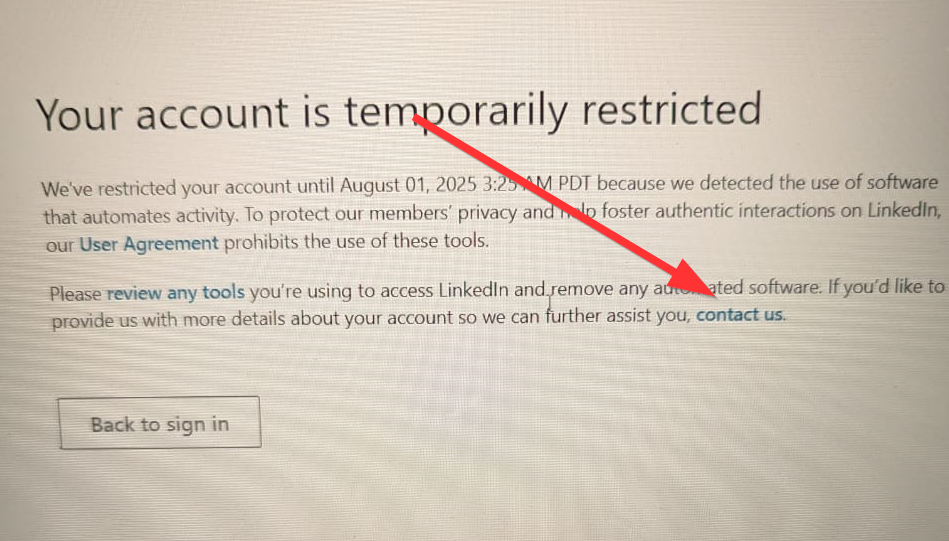

If LinkedIn has temporarily restricted your account, you will see a notice at sign-in with a Contact us button. Click it:
LinkedIn asks two questions. Answer them like this:
Question 1: LinkedIn prohibits the use of third-party software or browser extensions that automate activities on LinkedIn. If you believe your account has been inadvertently restricted, tell us why.
➔ Describe factually, in two or three sentences, what you last did on LinkedIn, for example: "Over the past week I sent connection requests to people in my target audience and replied to messages. Please review my account."
Question 2: Help improve your LinkedIn experience and list the third-party programs, services, or plug-ins you currently use to automate activities on LinkedIn.
➔ Answer truthfully and briefly. Accusations, threats or copy-pasted forum templates will not help.
Until LinkedIn replies
- Pause every CompLeadly step that sends invitations or messages. They would fail during the restriction anyway.
- Withdraw old, unanswered invitations and lower your daily limit for connection requests afterwards (guideline: about 50 per day, around 200 per week).
- If LinkedIn asks for identity verification, upload your ID; the name on your profile should match it.
Reasons, timelines and prevention are covered in detail in LinkedIn account restricted: reasons, recovery steps, prevention.